Introduction

While today’s social scene runs on video streams, swipe stacks and recommendation engines, plain text still holds its ground. Chatib keeps the formula minimal: open the site, choose a room, and type—no lens, no swipe, no feed.
This review walks through Chatib room by room, checks how much you can do without an account, sizes up the safety tools, and flags the spots where bare-bones might feel like bare-minimum. If you want sites like Chatib—or just miss the sound of plain typing—keep reading.
What is Chatib?
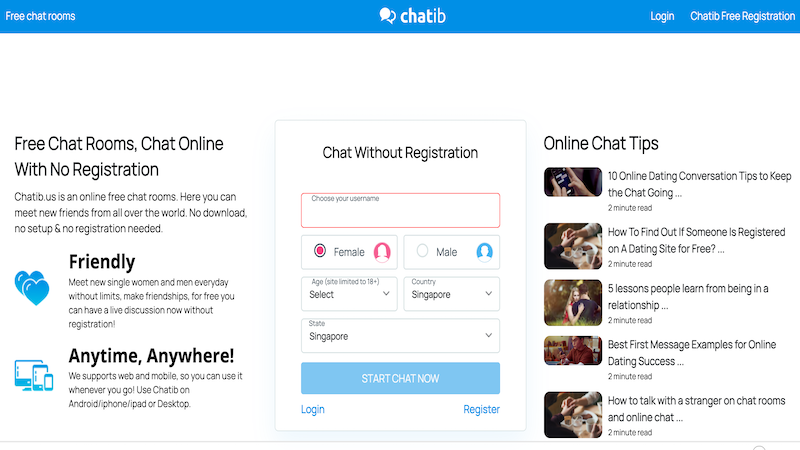
Chatib’s philosophy is clear. The front page keeps its clothes in a small suitcase: one login box and a single “Start Chat Now” link. Nothing flashes, nothing explains. That austerity lets you start typing within seconds, yet you’ll teach yourself the rules as you go, because guidance is almost absent and the look belongs to an earlier web season—still working, still plain.
A critical fact: Chatib is web-only. There is no official mobile app. You access it through your phone or desktop browser. For some, this is a deal-breaker; for others, it means no download, no setup & no registration needed to start. You can jump in as a guest immediately. However, registering unlocks a few perks, like choosing a username.
How Chatib Actually Works
Chatib’s entire ecosystem revolves around its chat rooms. The experience is purely text-based—there is no video chat functionality here.
-
💬 Public & Private Chat: You can join large, topic-based public rooms (like “General,” “Flirt,” “Music”) or initiate a one-on-one private chat with any user you see online.
-
👤 Finding People: The interface typically shows a list of active strangers in your room or on the site, displaying their self-reported age, country, and a brief bio. You can click on any to start a private conversation.
-
❗️ The Registration Push: While guest access is allowed, the platform heavily encourages registering. Even guest entry forces you to type age, gender, and country into a blank form—no ID check, so the data may be fiction. If you want GIFs, coloured text, or a friends list, you still have to register a free account.
Pros & Cons of Chatib
Let’s break down what Chatib offers and what it doesn’t.
✅ The Advantages
-
Completely Free: There are no premium tiers. All chat rooms and features are 100% free.
-
Simple & Fast: No complicated profiles or matching algorithms. See someone, talk to them.
-
Guest Access: Test the waters without giving an email.
-
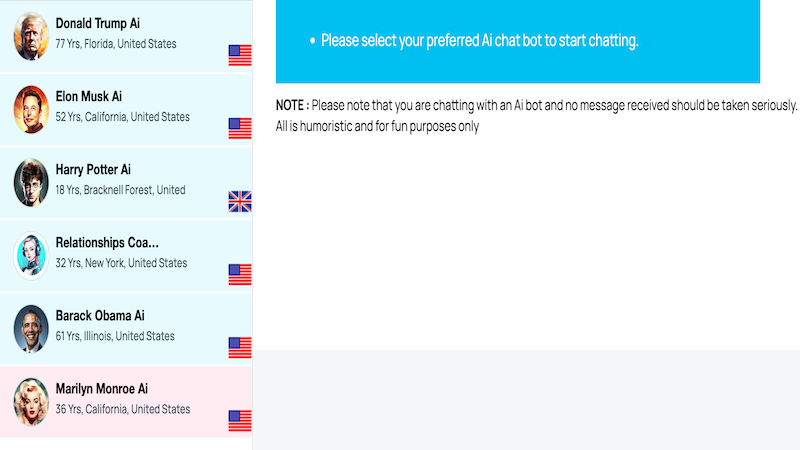
AI Chat Bots (A Unique Twist): Not in the mood for real people? Chatib offers humorous AI bots impersonating celebrities (e.g., Elon Musk, Harry Potter). It’s marked clearly for fun purposes only.
❗ The Drawbacks
-
Ad-heavy: banners crowd every page and can send you to unknown sites with an accidental click.
-
Text-only: no video or voice, so look elsewhere if you want to see or hear your partner.
-
Clunky feel: moving between rooms or tools can lag and break the flow.
-
Idle timeout: stay active or the server drops you after a long pause.
Is Chatib Safe?
This is the million-dollar question. Chatib operates with a self-policing, “user beware” model.
-
🛡️User-Enabled Protections: The tools are there: you can Block or Report any user directly from the chat window. This is your primary defense.
-
🖼️ Image Safety Feature: A smart feature blurs images received in chat. You must actively choose to “receive it,” protecting you from unsolicited explicit content.
-
⚠️ The Caveats: There is no stringent age verification or active real-time moderation in every room. Safety relies heavily on user reports. The prevalence of ads also poses a security risk through misleading clickbait. For a safe experience, extreme caution is advised.
Who Is Chatib Best For?
Chatib isn’t for everyone, but it serves a specific niche well.
-
The Text Purist: prefers typing to talking on camera and likes words without faces.
-
The Casual Browser: drops in to pass time inside low-pressure, topic-stamped rooms.
-
The Nostalgic User: misses the early-2000s web-chat feel and doesn’t mind dated pixels.
-
NOT For: anyone who wants verified names, smart matchmaking, video/voice calls, or tight, ad-free moderation.
Tips for a Better Chatib Experience
-
Use a Disposable Email if Registering: Since security isn’t its strong suit, don’t use your primary email.
-
Leverage the Blur Feature: Never auto-accept images. Use the blur filter to your advantage.
-
Be Ready to Block/Report: Don’t engage with trolls or creeps. Use the block button liberally.
-
Mind the Ads: Be careful where you click. Intrusive ads are the platform’s main flaw.
-
Try the AI for Fun: The celebrity chatbots are a quirky, harmless diversion.
Conclusion
Chatib stands as a stark, no-apologies alternative in the social discovery space. It offers a specific value proposition: instant, anonymous, text-only chat rooms for zero cost. It succeeds in being simple and accessible, capturing the spirit of early internet chatting.
However, its simplicity is a double-edged sword. The lack of video, heavy advertising, minimal moderation, and clunky interface are significant trade-offs. The question “Is Chatib safe?” has a nuanced answer: it provides the basic tools for you to protect yourself but offers little proactive safety net.
If your goal is uncomplicated text chatter with global strangers and you can navigate its pitfalls, Chatib delivers. But if you seek a secure 1v1 video chat for making genuine connections, its limitations become glaring.
Frequently Asked Questions
-
Is Chatib safe to use?
Chatib provides basic safety tools (block,report, and image blurring), but it has minimal active moderation and intrusive ads. Your safety largely depends on your own caution. It’s riskier than heavily moderated platforms.
-
Is Chatib really free?
Yes—every feature costs nothing, and no premium tier exists; banner ads on the page cover the bills.
-
My Chatib account is restricted. How do I fix it?
Restrictions usually follow a breach of the posted rules. Open the “Contact Us” form, explain the issue, and wait; staff may reply, yet a response is not guaranteed.
-
How do I delete my Chatib account?
Open Settings, choose “Delete Account,” and confirm the prompts. Once the profile is erased, recovery is impossible.
-
What are some good sites like Chatib?